Google Index Checker | Bingo Web Rabbit

Google Index Checker


Introduce una URL


Captcha

Google Index Checker See Which of Your URLs Are in Google

You publish a page. You wait. You check Google. Nothing.

Did Google not find it? Is it indexed but buried? Did you accidentally put a "noindex" tag?

This is the most frustrating part of SEO. You do the work. Google acts like your page doesn't exist.

Our Google Index Checker tells you instantly: is this URL in Google or not?

Enter one or more URLs. One per line. We'll check each against Google's index. You'll know in seconds what Google knows – or doesn't know – about your pages.

Who Actually Needs an Index Checker?

Let me give you real scenarios. Not SEO theory.

Bloggers – You published a new post yesterday. Google usually indexes you in hours. This time, nothing. Run the URL through our checker. Not indexed. Now you know something's wrong. Fix it before you lose traffic.

Website owners – You redesigned your site. Changed URL structures. Did Google follow the 301 redirects? Check your old URLs. If they're still indexed (instead of redirecting), you have a problem.

SEO professionals – A client says "my pages aren't ranking." First step: check if they're indexed at all. You can't rank if you're not in the index. Run 50 client URLs. Find the 10 that Google ignored. Prioritize those.

Ecommerce store owners – You added 200 new product pages. Google indexed 20. Where are the rest? Run them through our checker. Find the pattern. Maybe your product pages are too thin. Maybe your sitemap is broken.

Agency owners – Before reporting to a client, verify your work. Did the pages you optimized actually get indexed? Run them. If they're not indexed, don't send that report.

Freelance writers – A client says "I want you to write 10 articles." First, check if their existing articles are indexed. If half aren't indexed, that client has a technical problem. Fix that before writing more content.

How Our Google Index Checker Works (No Mystery)

We don't guess. We don't use outdated caches. We check with Google directly.

Here's exactly what happens:

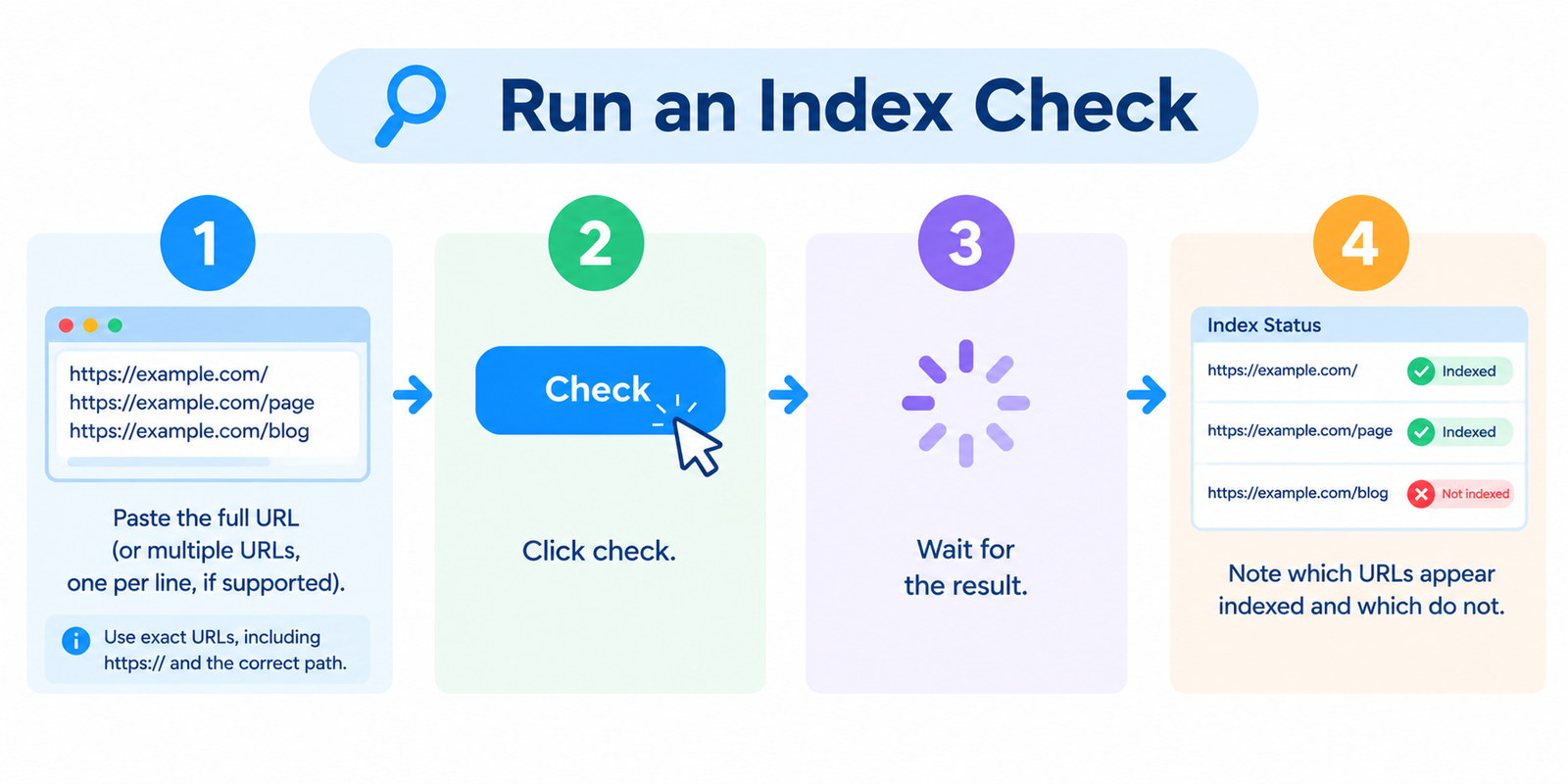
Step 1 – You enter URLs. One per line. Any number – we handle small batches and large ones.

Step 2 – We send a site: query to Google for each URL. Same as you typing site:yoursite.com/your-page into Google. But automated. And faster.

Step 3 – We analyze Google's response. If Google shows a result with your exact URL, it's indexed. If Google says "did not match any documents" or shows nothing, it's not indexed.

Step 4 – We also check for canonical tags and noindex. Even if a URL is in Google, it might be indexed with the wrong canonical. We flag that.

Step 5 – You get a clean results table. URL, indexed status (Yes/No), and any warnings.

What You Get Back

URL Indexed Google Result Page Warnings
https://yoursite.com/page1 Yes Shows as first result None
https://yoursite.com/page2 No No results found Check noindex tag
https://yoursite.com/page3 Yes Shows but canonical points elsewhere Canonical mismatch

That's it. No fluff. No "authority score" nonsense. Just answers.

How to Use the Tool (Step by Step)

Step 1 – Gather the URLs you want to check. Examples:

https://bingowebrabbit.com/suspicious-domain-checker
https://bingowebrabbit.com/link-price-calculator
https://bingowebrabbit.com/screenshot-generator

Step 2 – Open our Google Index Checker page.

Step 3 – Enter each URL on a new line. Can be one URL, can be a hundred.

Step 4 – Click "Check Index Status".

Step 5 – Wait. Usually 2–5 seconds per URL. For 100 URLs, maybe a minute.

Step 6 – Review the results. See which URLs are indexed. Which aren't. Then fix the missing ones.

Real Examples from Users

A blog owner had 50 posts. Only 20 were getting traffic. Ran all 50 through our checker. Found that 15 posts weren't indexed at all. Reason? They never submitted a sitemap. Google just never found them. Fixed the sitemap. Within two weeks, all 50 were indexed.

An ecommerce store launched 500 new products. After a month, only 80 were indexed. Ran the product URLs through our checker in batches. Saw a pattern: products without descriptions weren't indexed. Added descriptions to the missing 420. Resubmitted. Indexed within days.

An SEO agency was about to send a monthly report to a big client. First, they ran 200 client URLs through our checker. Found that 30 URLs weren't indexed – including the client's new homepage. Turns out someone added a "noindex" tag by mistake. Fixed it. Reported the fix. Client was grateful instead of angry.

A freelance writer checked a potential client's website before accepting work. Client had 100 blog posts. Only 35 were indexed. Writer asked why. Client didn't know. Writer decided not to take the job – the client had bigger problems than writing.

Common Questions (Straight Answers)

What's the difference between "indexed" and "ranking"?
Indexed means Google knows your page exists. Ranking means Google shows it for some search query. You need indexing first. Ranking comes later (or never, if your content isn't good enough). Our checker only tells you about indexing.

Can you check any URL, even if it's not mine?
Yes. Any public URL. Want to see if a competitor's new page is indexed? Enter it. We'll check. No login required.

How accurate is this?
Very. We query Google's live search results. Same as you typing site: into Google. The only difference is we automate it. If Google says it's there, it's there.

What about URLs that are indexed but with the wrong canonical?
We flag that as a warning. Example: You submit page-a.html, but Google shows page-b.html as the canonical. That means Google chose a different URL as the "master" version. You might want to fix that.

Why would a URL not be indexed?
Lots of reasons. Common ones:

  • Noindex tag in the HTML or HTTP header
  • Blocked by robots.txt
  • No internal links pointing to it
  • Not in sitemap (and Google never found it)
  • Duplicate content (Google chose another version)
  • Page is too thin (low quality, very short)
  • Site has a penalty (rare but possible)

Our tool doesn't tell you why – it just tells you if. You have to investigate the why yourself.

Is this free?
Yes. For normal usage – checking your own URLs, a few hundred a day. If you're a huge agency checking tens of thousands daily, contact us for an API. We're reasonable.

Will checking too many URLs get me blocked by Google?
We handle rate limiting automatically. We spread requests out. We respect Google's terms. For normal use (a few hundred checks per day), no problem. If you're checking 10,000 URLs in an hour, we'll slow it down intentionally.

Why Index Checking Is a Core SEO Task

You'd be surprised how many websites have indexing problems. Studies show that about 30% of pages on an average website are not indexed. That's almost one in three pages wasting away, invisible to search engines.

Common reasons you might not know:

Your sitemap is broken – Google says "we found 200 URLs in your sitemap" but actually your sitemap has a formatting error. Google ignores it. You never notice because your sitemap plugin says "successfully submitted."

Your internal linking is broken – A page with no internal links pointing to it is hard for Google to find. Even if it's in your sitemap, Google might deprioritize it.

You have a rogue noindex – Someone added <meta name="robots" content="noindex"> to your template. Every new page gets it. You never notice because you don't check.

Your CMS is blocking Google – Some plugins add "X‑Robots‑Tag: noindex" accidentally during updates. Happens more often than you think.

The only way to catch these issues is to check. Regularly. Our tool makes it fast.

Pro Tips for Power Users

Check weekly – Run your 50 most important URLs through our checker every Monday. If any drop out of the index (yes, that happens), you catch it within days, not months.

Check after every site update – Changed your URL structure? Added a new plugin? Ran a migration? Check your URLs immediately after. Don't wait for traffic to drop.

Compare indexed vs. submitted – Export your sitemap URLs. Run them through our checker. Compare "submitted" vs "indexed". If numbers don't match, something's wrong.

Check competitor new content – Set a reminder to check your top competitor's new blog posts weekly. See how fast Google indexes them. Use that to set benchmarks for your own site.

Check your old content – Pages that used to rank but stopped? Run them. Maybe they got de-indexed (happens with low‑quality or outdated content). If they're still indexed, the problem is ranking. If not, the problem is indexing.

Troubleshooting (Because Nothing's Perfect)

"Tool says not indexed but I see my page in Google when I search" – Rare, but possible. Sometimes Google shows a page but with a different URL (like stripping trailing slashes or parameters). Our exact‑match check might miss that. Try searching site:yoursite.com "unique sentence from your page" manually.

"Tool says indexed but I don't see any traffic" – Indexing doesn't guarantee ranking. Your page could be indexed on page 50 of search results. That's a content or authority problem, not an indexing problem.

"Too many requests" error – You checked a huge batch in a very short time. Wait an hour. Try again with a smaller batch. Or contact us for API access.

"URL not valid" error – Make sure your URLs include http:// or https://. Also check for typos. A missing slash or extra space will cause this.

Final Word

You can't rank if you're not indexed. It sounds obvious, but so many people skip this basic check.

They write content. They publish. They wait. Nothing happens.

Then they ask "why isn't my content ranking?" – without ever asking "is my content even in Google?"

Don't be that person.

Use our Google Index Checker before you do anything else. Enter your URLs. See what Google actually knows about your site.

If a page isn't indexed, fix it. Submit it to Google Search Console. Add internal links. Check your noindex tags. Resubmit your sitemap.

If a page is indexed but not ranking, then worry about keywords and backlinks and content quality. But first things first.