Online Ping Website Tool
Enter your blog url
Enter your blog name
Enter your blog updated url
Enter your blog RSS feed url


Processing...
Online Ping Website Tool
Published a new blog post or made an important update to your website?
Our free Online Ping Website Tool can send update notifications to supported ping and web services to let them know that content on your website has changed.
Important: Pinging is not the same as submitting a page directly to Google for indexing. A successful ping does not guarantee crawling, indexing, or higher search rankings.
How to Use the Online Ping Website Tool
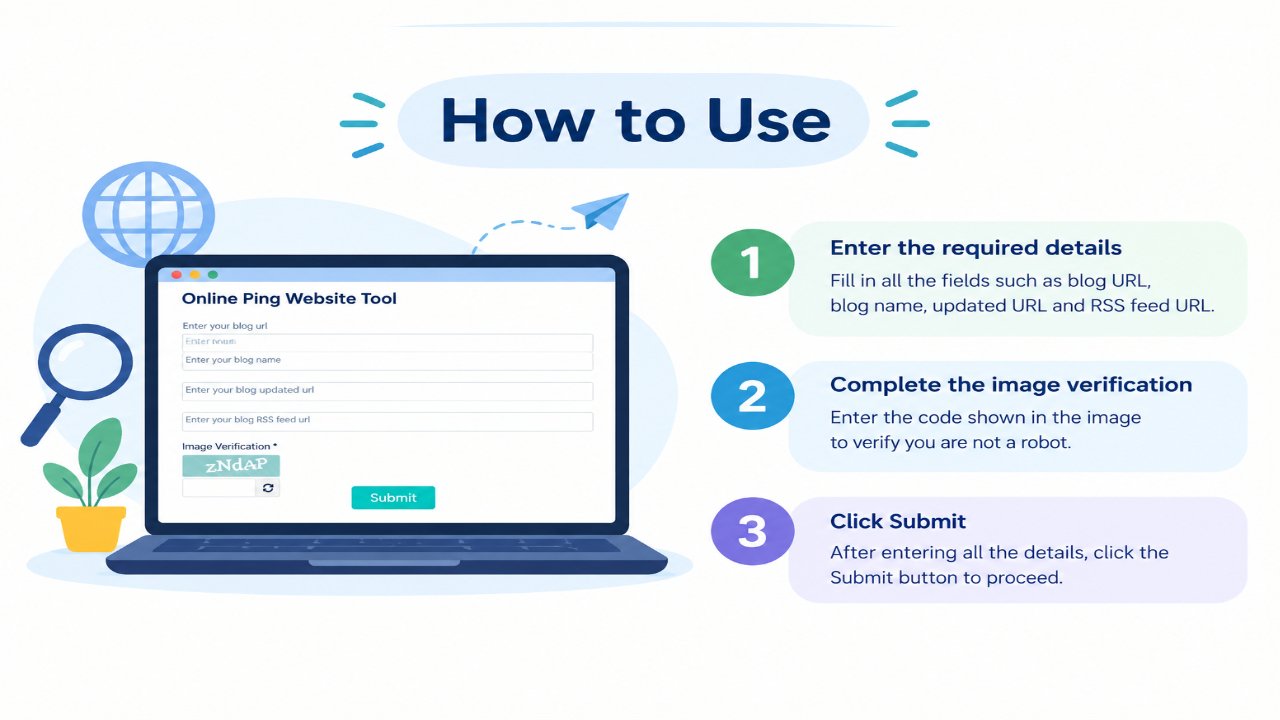
- Enter your website or blog URL.
- Add your website or blog name if requested.
- Enter the URL of the page you recently published or updated, when supported.
- Add your RSS or feed URL if your website has one.
- Click the submit or ping button.
- Wait while the tool sends requests to its supported services.
- Review the result messages shown by the tool.
No account is required for the standard tool.
What Is a Website Ping Tool?
A website ping tool sends update notifications to supported services when a website or feed has new or changed content.
Historically, ping services were commonly used by blogs and publishing platforms to notify aggregators, directories, feed services, and some search-related systems about new posts.
The modern web works differently, and major search engines now have their own preferred methods for discovering and processing updated URLs.
Because of this, a ping tool should be treated as a supporting publishing utility, not as a primary indexing or SEO method.
What This Tool Can Do
Depending on the services supported by the tool, it may help you:
- Send update notifications to compatible ping services
- Notify supported feed or blog services about new content
- Process several notification requests from one interface
- Confirm whether a supported service accepted a request
- Add an extra notification step to your publishing workflow
What This Tool Cannot Guarantee
A successful ping does not guarantee:
- Google indexing
- Bing indexing
- Immediate crawling
- Higher search rankings
- More organic traffic
- Faster ranking improvements
- Permanent inclusion in a search index
Search engines independently decide which URLs to crawl, index, and rank.
Pinging vs Crawling vs Indexing
| Term | What It Means |
|---|---|
| Ping | A notification sent to a supported service indicating that content may have changed. |
| Crawling | When a search-engine crawler visits and retrieves a webpage. |
| Indexing | When a search engine processes a page for possible inclusion in its search index. |
| Ranking | How search systems determine which eligible results to show for a particular query. |
These are separate processes. A notification being accepted does not mean that a crawler will immediately visit the page or that the page will be indexed.
Does Website Pinging Submit a Page to Google?
Not in the way older SEO tutorials often describe.
Google previously supported a public sitemap ping endpoint that allowed websites to notify Google when a sitemap changed. That endpoint has been discontinued.
For websites you own, Google's current recommended options include:
- Using an XML sitemap
- Submitting and monitoring the sitemap in Google Search Console
- Using the URL Inspection tool for individual important URLs
- Maintaining crawlable internal links
Submitting or requesting a crawl does not guarantee immediate indexing.
What About Bing and IndexNow?
Bing supports IndexNow, a protocol designed to notify participating search engines when URLs are added, updated, or deleted.
IndexNow is different from a traditional generic ping tool because participating websites normally verify ownership using an API key.
Even with IndexNow, notifying a search engine does not guarantee that the submitted URL will be crawled or indexed.
If your CMS, hosting provider, CDN, or SEO plugin supports IndexNow, it may be a more modern option for notifying compatible search engines about URL changes.
When a Ping Tool May Still Be Useful
Blog and Feed Publishing
Some publishing or feed-related services may still accept update notifications.
Testing Notification Services
Developers and website owners can see whether supported endpoints respond to update requests.
Publishing Workflows
A ping can be used as an optional additional step after publishing new content.
Learning About Web Publishing
The tool can help beginners understand how website-update notifications historically worked and how they differ from modern indexing systems.
Better Ways to Help Search Engines Discover Content
If search visibility is your main goal, focus first on the methods search engines currently recommend.
1. Use an XML Sitemap
An XML sitemap helps search engines discover important URLs on your website.
Keep your sitemap updated when important pages are added, removed, or changed.
2. Use Internal Links
Important pages should be linked from other crawlable pages on your website.
A page that cannot be reached through normal internal navigation may be harder for crawlers and users to discover.
3. Use Google Search Console
For an individual page that you own, Google Search Console's URL Inspection tool can be used to inspect its status and request indexing when appropriate.
Requesting indexing does not guarantee immediate crawling or inclusion in search results.
4. Use IndexNow Where Supported
IndexNow can notify participating search engines when URLs are created, updated, or deleted.
It is most useful when implemented properly through your website, CMS, CDN, or another supported integration.
5. Keep Content Accessible
Make sure important pages:
- Return a normal HTTP status
- Are not unintentionally blocked by
robots.txt - Do not contain an accidental
noindexdirective - Have useful internal links
- Provide meaningful content for visitors
Should You Ping the Same URL Repeatedly?
No.
Repeatedly sending notifications for the same unchanged page is unlikely to provide additional benefit.
Use notification services when content has genuinely been:
- Published
- Substantially updated
- Moved
- Removed, when the notification protocol supports deletion updates
Repeated submission should not be treated as a method for forcing search engines to crawl or rank a webpage.
Does Pinging Improve SEO Rankings?
No direct ranking improvement should be expected simply from pinging a URL.
Search rankings depend on many factors related to the query, page content, usefulness, website signals, links, technical accessibility, and other search-system considerations.
A ping notification does not make a low-quality page become a high-quality result.
Ping Tool vs XML Sitemap vs IndexNow
| Method | Main Purpose | Best Use |
|---|---|---|
| Ping Tool | Sends notifications to supported ping or web services | Optional publishing workflow |
| XML Sitemap | Provides search engines with a structured list of important URLs | Ongoing URL discovery |
| Google URL Inspection | Checks Google information about an individual URL and allows eligible owners to request indexing | Important individual URLs |
| IndexNow | Notifies participating search engines about added, updated, or deleted URLs | Automated change notifications where supported |
Common Misconceptions
“Pinging guarantees indexing.”
False. A notification may be received without the URL being crawled or indexed.
“Pinging the same page repeatedly makes Google crawl it faster.”
There is no reason to expect repeated submissions to accelerate crawling.
“A successful response means the page was indexed.”
No. It generally means only that the receiving service accepted or processed the request.
“More ping services means better rankings.”
No. The number of notification endpoints used is not a measure of page quality or ranking potential.
Practical Tips
- Use pinging only as an optional supporting step.
- Do not repeatedly ping unchanged URLs.
- Keep your XML sitemap accurate and updated.
- Use Google Search Console for websites you own.
- Consider IndexNow for supported search engines and platforms.
- Make sure important pages are internally linked.
- Check crawl and indexing issues before assuming a notification problem.
- Focus primarily on useful content and a technically accessible website.
Frequently Asked Questions
Is the Online Ping Website Tool free?
Yes. You can use the standard tool without creating an account.
Will pinging improve my Google rankings?
No. Pinging does not guarantee or directly produce higher search rankings.
Will this tool get my page indexed by Google?
No indexing guarantee can be made. Google's old public sitemap ping endpoint has been discontinued. For websites you own, use current Google Search Console and sitemap methods.
Can pinging make a page get crawled immediately?
No. Search engines decide when URLs are crawled.
How often should I use this tool?
Use it only when you have a legitimate new or meaningfully updated page or feed. There is little reason to repeatedly ping unchanged content.
Do I need an RSS feed?
Not necessarily. If the tool supports an RSS or feed field and your website has one, you may provide it. Its usefulness depends on the receiving service.
Is website pinging still useful in 2026?
Traditional pinging is much less important for major search-engine indexing than it once was. It may still be useful for compatible feed, blog, or notification services, while modern search engines provide other submission and discovery methods.
What should I use for Google?
Use crawlable internal links, an XML sitemap, Google Search Console, and the URL Inspection tool where appropriate.
What should I use for Bing?
Bing supports URL submission and recommends IndexNow for automated notifications about changed URLs.
Related Tools
- XML Sitemap Generator – Create a sitemap for important website URLs
- Google Index Checker – Perform a basic index-status check
- Robots.txt Generator – Create basic crawler directives
- Server Status Checker – Check webpage HTTP responses
- Meta Tags Analyzer – Review webpage meta information
Disclaimer
The Online Ping Website Tool sends update requests only to the services supported by the tool. A successful response does not guarantee that a webpage will be crawled, indexed, ranked, or receive search traffic.
Search-engine submission methods and supported endpoints can change over time. For websites you own, use current documentation and webmaster tools from the relevant search engine for authoritative indexing and crawling information.