Geben Sie bis zu 40 Domains ein (jede Domain muss sich in einer separaten Zeile befinden)
If you run multiple websites – especially for SEO – you've probably heard this: "Don't host all your sites on the same Class C IP address."
Why? Because Google looks at IP neighborhoods. If ten of your sites all live on the same Class C block, they look like a network. A link from one to another loses value. Worse, if one site gets penalized, others might get dragged down.
Our Class C IP Checker tells you exactly which IP class each domain lives in.
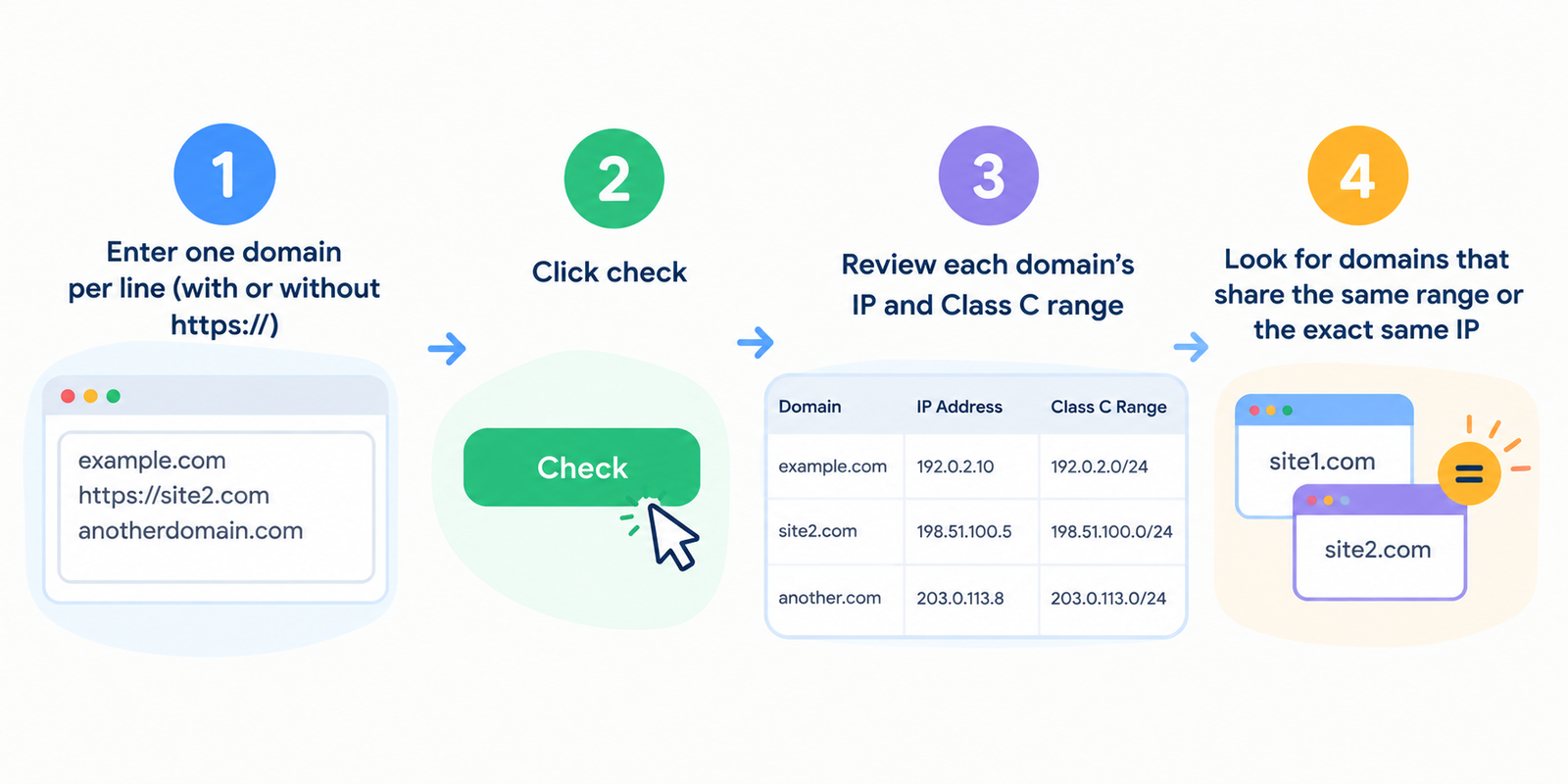
Enter one or more URLs. One per line. We'll show you the IP address and the Class C range for each. Then you can see which sites are on the same block.
No manual WHOIS lookups. No calculating subnet masks. Just paste, click, and know.
Let me give you real examples. Not SEO myths.
SEO agencies – You're building a Private Blog Network (PBN) or just a legitimate set of niche sites. You know they shouldn't share IP blocks. Run all your domains through our checker. See which ones are on the same Class C. Move hosts for the duplicates. Protect your network.
Link builders – You're buying links from a seller who claims "all sites are on different Class C IPs." Verify it yourself. Get the URLs. Run them. If three share the same Class C, that seller is lying or clueless.
Web hosts – A client asks "are my five sites on different Class C addresses?" You're not sure. Run the domains. Show the client a clean report. Or realize you need to request different IPs from your hosting provider.
Affiliate marketers – You have multiple sites in the same niche. You interlink them (carefully). But if they all share a Class C, those links are nearly worthless. Check first. Host separately.
Security researchers – You find a cluster of suspicious domains. Run them through our checker. They all share a Class C. That's a strong signal they're controlled by the same person or group.
Freelance SEOs – A client gives you a list of 50 backlinks they bought. You need to check if any come from the same IP block (a sign of a PBN). Our tool does it in seconds.
Let me explain without the networking jargon.
Every server on the internet has an IP address. Something like 192.168.1.100.
That IP is divided into four numbers. The first three numbers are the "Class C" part.
Example: 192.168.1.100 – Class C is 192.168.1
Any other IP starting with 192.168.1 (like 192.168.1.50 or 192.168.1.200) is in the same Class C block.
Why does this matter? Because many web hosts put hundreds or thousands of websites on the same Class C block. Those sites are "neighbors."
Google knows this. If you own multiple sites in the same Class C and you link between them, those links are less valuable. They look like self-promotion. Some SEOs say they carry almost no weight.
For safety, you want your sites spread across different Class C blocks. Ideally, different Class B or A as well, but Class C is the minimum.
We don't guess. We look up the actual IP address of each domain.
Here's exactly what happens:
Step 1 – You enter URLs. One per line. Any number. We handle small and large batches.
Step 2 – We perform a DNS lookup for each URL. We find the IPv4 address (if the site has multiple IPs, we take the primary one).
Step 3 – We extract the Class C range. That's the first three octets of the IP. For 203.0.113.45, the Class C is 203.0.113.
Step 4 – We also detect if sites are on the exact same IP (not just same Class C). That's even worse.
Step 5 – We group results by Class C. You'll see which domains share a block.
Step 6 – You get a clean report.
| URL | IP Address | Class C Range | Shared With |
|---|---|---|---|
| site1.com | 203.0.113.45 | 203.0.113 | site2.com |
| site2.com | 203.0.113.78 | 203.0.113 | site1.com |
| site3.com | 198.51.100.22 | 198.51.100 | (unique) |
| site4.com | 203.0.113.90 | 203.0.113 | site1.com, site2.com |
Plus a summary: "3 domains share Class C 203.0.113" and "2 domains share the exact same IP."
Step 1 – Gather the domains you want to check. Examples:
bingowebrabbit.com
myothersite.com
mythirdsite.net
Step 2 – Open our Class C IP Checker page.
Step 3 – Enter each domain or URL on a new line. You can use full URLs like https://site.com or just site.com.
Step 4 – Click "Check Class C".
Step 5 – Wait a few seconds. DNS lookups are fast – usually 1–2 seconds per domain.
Step 6 – Review the results. Look for domains that share the same Class C. Those are the ones you might want to separate.
An SEO agency had 20 client sites all on the same hosting account. They ran our checker. Found that all 20 shared the same Class C. They were interlinking them for SEO. Those links were doing almost nothing. They moved 15 sites to different hosting providers. Within two months, rankings improved across the board.
A link seller promised "diverse Class C IPs" for their PBN. A buyer ran the seller's sample domains through our checker. All five shared the same Class C. Buyer walked away. Saved thousands of dollars.
An affiliate marketer built three sites in the same niche. Hosted them all on the same cheap shared plan. Ran our checker. Same Class C. He moved two sites to different hosts (one to DigitalOcean, one to a small reseller). His interlinking strategy finally started working.
A security analyst found 15 domains all linking to the same scam site. Ran them through our checker. All 15 shared the same Class C IP block. That proved they were controlled by the same operator. Reported the entire block.
What's the difference between Class C, Class B, and Class A?
Class C = first three numbers of IP (e.g., 203.0.113) – 256 possible IPs.
Class B = first two numbers (203.0) – 65,536 possible IPs.
Class A = first number (203) – 16 million possible IPs.
For SEO, Class C diversity is the minimum. Class B is better. Class A is best but hard to achieve.
Does Google really care about Class C IPs?
Yes, but it's complicated. Google's original PageRank patent mentioned "different Class C subnets" as a factor for trust. Modern Google is smarter – it looks at many signals. But most SEOs agree: links from the same Class C are less valuable. For hosting your own network, different Class C is a best practice.
What if two domains share the same Class C but different hosts?
Possible but rare. Example: two different hosting companies might both use IPs from the same larger block. Unlikely. Usually, same Class C means same data center or same hosting provider.
What about shared IP addresses?
If multiple domains share the exact same IP (not just Class C), that's even worse. That means they're on the same server. Google definitely sees that as a strong connection. Our tool flags exact IP matches separately.
Can I check domains that are behind Cloudflare?
Yes, but you'll see Cloudflare's IP, not the origin host's IP. That means all Cloudflare‑protected sites might show the same or similar Class C (Cloudflare's range). Our tool will warn you: "Behind CDN – actual IP hidden."
Is this free?
Yes. Normal usage – checking your own sites, a few hundred checks a day – is free. Bulk commercial use? Contact us for API.
Let me be direct. If you're just running one website, you don't care about this. Class C checking is for people with multiple sites.
Here's the logic:
Link networks – If you own sites A, B, and C, and you link A→B and B→C, you want Google to think these are natural, independent sites. Same Class C IP screams "same owner." Links lose power.
PBNs (Private Blog Networks) – Whether you love or hate them, if you use a PBN, Class C diversity is non‑negotiable. Every PBN site should be on a different Class C. Ideally different Class B.
Hosting multiple client sites – You might host several client sites on the same server. That's fine. But don't interlink them for SEO. Google will notice.
Guest posting at scale – If you write guest posts from many different sites, but all those sites share a Class C, Google can connect the dots. Spread them out.
The rule of thumb: No more than 2–3 of your sites in the same Class C. Zero is better.
Check before you buy hosting – Planning to buy multiple hosting accounts? Ask the provider for IP ranges first. Or buy a small test account, get the IP, check the Class C. Then buy more accounts from different providers.
Use different hosting providers – DigitalOcean, Linode, Vultr, AWS – they all have different IP ranges. Spread your sites across them. Our checker will confirm you're truly diverse.
Check your competitors' networks – Run a set of competitor domains. See if they're all on the same Class C. If yes, they might be running a cheap PBN. You can outrank them by building higher quality, truly diverse links.
Monitor for changes – Hosting providers sometimes move IPs. Run your sites through our checker monthly. If two of your sites suddenly share a Class C, investigate. Maybe your host migrated them without telling you.
Batch check large lists – Got 100 domains? Run them all. Sort the results by Class C. Look for clusters. Any cluster of 3+ domains in the same Class C is a risk.
"No IP address found" – The domain might not exist or DNS is misconfigured. Double‑check spelling.
"IP is IPv6, not IPv4" – Our tool prefers IPv4 because Class C is an IPv4 concept. If a site only has IPv6, we'll show IPv6 and note that Class C doesn't apply. Most sites still have IPv4.
"All my sites show the same Class C even though they're on different hosts" – That's suspicious. Maybe your hosts are reselling from the same upstream provider. Try different hosts entirely. Or contact us – we can help interpret.
"My site is behind Cloudflare – what do I do?" – You can't see the real IP. But you can temporarily point DNS away from Cloudflare, run the check, then change back. Or accept that Cloudflare hides your origin.
"I get an error for some URLs" – The domain might be down or blocking our DNS queries. Try again later. Or check manually with ping command.
Class C IP checking sounds technical. But it's simple: you don't want all your websites living on the same block.
It's like having five different businesses all in the same building. Customers (and Google) will assume they're related. That's fine if you're honest about it. But for SEO link value, it's a problem.
Our Class C IP Checker shows you exactly which of your domains share IP neighborhoods.
Enter your URLs. One per line. See the results.
Then decide: