www Redirect Checker
Entrez une URL
Vérificateur de redirection WWW
Votre site Web redirige-t-il correctement entre les versions avec et sans www ?
Entrez un domaine ci-dessous et cet outil gratuit affichera le fonctionnement de la redirection, y compris le chemin de redirection, le code d'état et la destination finale. Il peut vous aider à repérer les redirections manquantes, les boucles de redirection ou les chaînes de redirection inutiles.
Comment l'utiliser
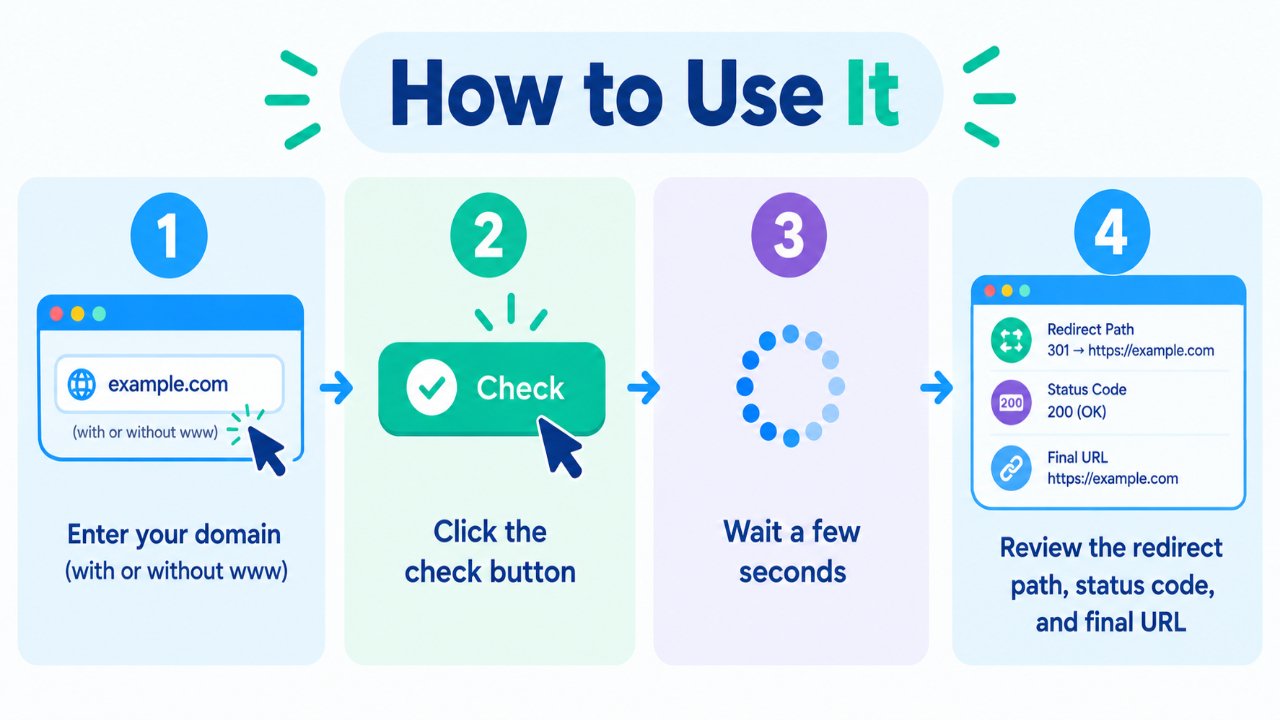
- Entrez votre domaine avec ou sans
www. - Cliquez sur le bouton de vérification.
- Attendez quelques secondes que le test de redirection se termine.
- Examinez le chemin de redirection, le code d'état HTTP et l'URL finale.
Vous pouvez tester à la fois example.com et www.example.com pour confirmer que votre version préférée est configurée correctement.
Pourquoi cette vérification est importante
Les versions avec et sans www d'un site Web sont des noms d'hôtes différents. Si les deux versions sont accessibles indépendamment, il est important de configurer votre version préférée de manière cohérente plutôt que de laisser les visiteurs et les robots d'exploration avec plusieurs versions du même site.
Une configuration de redirection correctement configurée peut aider à éviter des problèmes tels que :
- Plusieurs versions accessibles des mêmes pages.
- Des URL incohérentes partagées ou liées.
- Des URL préférées peu claires pour les moteurs de recherche.
- Des expériences déroutantes pour les visiteurs.
- Des sauts de redirection inutiles.
Une approche courante consiste à choisir un nom d'hôte préféré et à rediriger définitivement l'autre version vers celui-ci.
www ou sans www — Lequel devez-vous choisir ?
Il n'y a pas d'exigence SEO universelle pour choisir entre www et sans www. Les deux peuvent fonctionner parfaitement. L'important est de choisir une version préférée et de l'utiliser de manière cohérente.
Version avec www (https://www.example.com)
Le nom d'hôte www est courant sur de nombreux sites Web et peut être utile lors de la gestion de sous-domaines et de certaines configurations de cookies.
Version sans www (https://example.com)
Cette version est plus courte et est souvent préférée par les propriétaires de sites Web qui souhaitent un domaine à l'apparence simple.
L'un ou l'autre choix convient. Choisissez une version et assurez-vous que l'autre redirige correctement.
À quoi ressemble une bonne configuration
Une configuration propre typique ressemble à ceci :
- Un nom d'hôte est sélectionné comme version préférée.
- Le nom d'hôte alternatif utilise une redirection permanente 301.
- Le protocole HTTP est redirigé vers HTTPS.
- Les chaînes de redirection sont maintenues aussi courtes que possible.
- Les liens internes utilisent systématiquement l'URL HTTPS préférée.
Par exemple, si votre version préférée est le nom d'hôte avec www :
http://example.com → https://www.example.com
Et :
https://example.com → https://www.example.com
Le chemin de redirection exact peut dépendre de votre serveur, de votre CDN, de votre configuration d'hébergement et de votre configuration.
Problèmes courants que cet outil peut aider à repérer
- Pas de redirection — les versions avec et sans www restent accessibles séparément.
- Boucle de redirection — les URL continuent de rediriger entre deux destinations ou plus.
- 302 au lieu de 301 — une redirection temporaire est utilisée alors qu'une redirection permanente peut être plus appropriée.
- Longue chaîne de redirection — plusieurs redirections se produisent avant que l'URL finale ne soit atteinte.
- Problème HTTP/HTTPS — un protocole redirige correctement tandis qu'un autre ne le fait pas.
- Destination inattendue — la redirection se termine sur une URL qui n'était pas prévue.
Trouver ces problèmes tôt peut faciliter le maintien de la cohérence de la structure des URL de votre site Web pour les visiteurs et les moteurs de recherche.
Bonnes pratiques rapides
- Choisissez un nom d'hôte préféré : avec ou sans www.
- Utilisez HTTPS comme protocole préféré.
- Utilisez des redirections 301 pour les modifications permanentes d'URL.
- Gardez les liens internes cohérents avec votre version préférée.
- Évitez les sauts de redirection inutiles.
- Revérifiez les redirections après des modifications DNS, d'hébergement, de serveur ou de CDN.
Foire aux questions
Ce vérificateur de redirection WWW est-il gratuit ?
Oui. Vous pouvez vérifier le comportement de redirection sans créer de compte.
Dois-je utiliser une redirection 301 ou 302 ?
Pour un choix permanent entre www et sans www, une redirection 301 est généralement appropriée. Une redirection 302 est normalement utilisée lorsque le changement est temporaire.
Est-ce que www ou sans www se classe mieux ?
Aucune version n'est intrinsèquement meilleure pour le référencement (SEO). Les deux peuvent être utilisées avec succès. La cohérence, des redirections correctes et un site Web correctement configuré comptent plus que le choix d'un nom d'hôte plutôt que d'un autre.
Les chaînes de redirection peuvent-elles causer des problèmes ?
Les longues chaînes de redirection ajoutent des requêtes supplémentaires et peuvent rendre l'exploration et le chargement des pages moins efficaces. Dans la mesure du possible, redirigez l'ancienne URL directement vers la destination finale.
Et si les deux versions se chargent sans rediriger ?
Choisissez votre nom d'hôte préféré et configurez une redirection permanente à partir de la version alternative. Assurez-vous également que vos redirections HTTP vers HTTPS sont configurées correctement.
Un CDN peut-il affecter les résultats de redirection ?
Oui. Un CDN ou une couche de mise en cache peut influencer la manière dont les redirections sont traitées ou mises en cache. Si vous avez récemment modifié votre configuration, effacez les caches pertinents et testez à nouveau les URL.
Outils gratuits associés
- Générateur de Robots.txt
- Générateur de sitemap XML
- Domaine en IP
- Trouver des enregistrements DNS
- Vérificateur Whois
Remarque
Le comportement de redirection peut varier en fonction de votre serveur Web, de votre CDN, de votre configuration d'hébergement et de votre mise en cache. après avoir effectué des modifications, testez à la fois les versions avec et sans www, ainsi que HTTP et HTTPS, pour confirmer qu'elles atteignent toutes votre URL finale préférée.