www Redirect Checker
Inserisci un URL
Verificatore di Reindirizzamento WWW
Il tuo sito web reindirizza correttamente tra la versione con www e quella senza www?
Inserisci un dominio qui sotto e questo strumento gratuito ti mostrerà come sta funzionando il reindirizzamento, inclusi il percorso di reindirizzamento, il codice di stato e la destinazione finale. Può aiutarti a individuare reindirizzamenti mancanti, loop di reindirizzamento o catene di reindirizzamento non necessari.
Come si usa
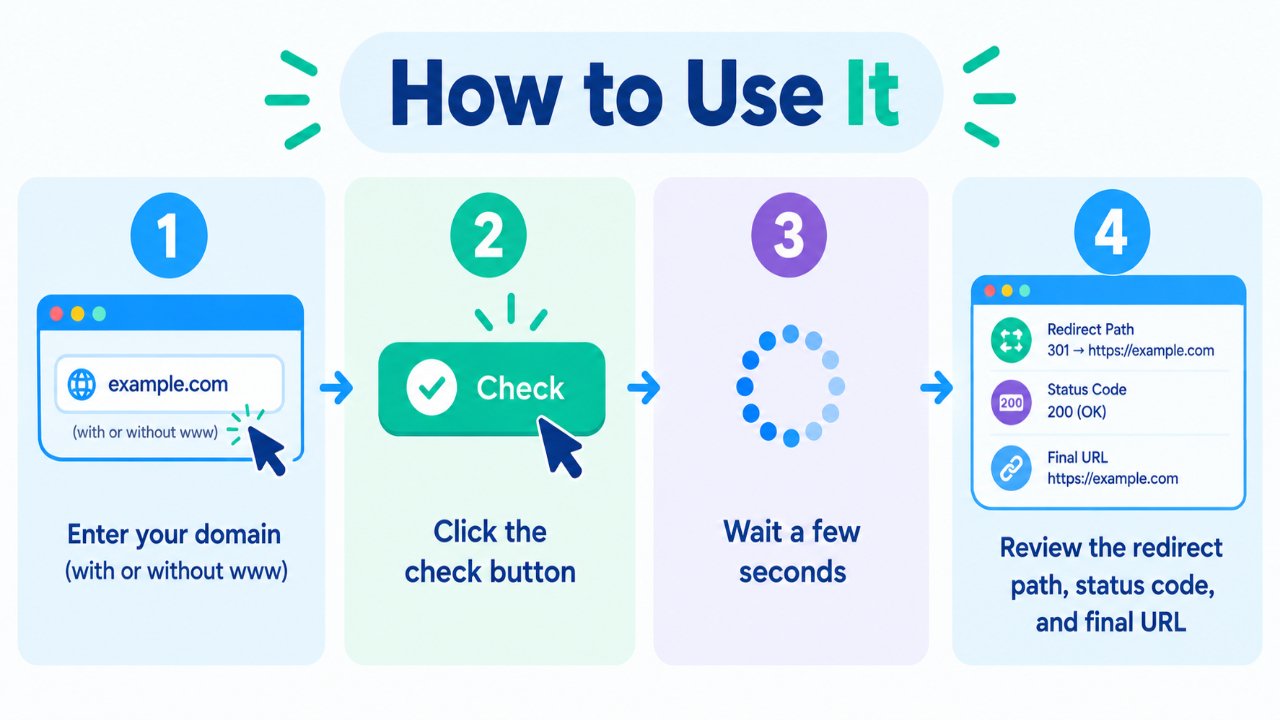
- Inserisci il tuo dominio con o senza
www. - Fai clic sul pulsante di verifica.
- Attendi qualche secondo affinché il test di reindirizzamento venga completato.
- Esamina il percorso di reindirizzamento, il codice di stato HTTP e l'URL finale.
Puoi testare sia example.com che www.example.com per confermare che la tua versione preferita sia configurata correttamente.
Perché questa verifica è importante
Le versioni con e senza www di un sito web sono hostname diversi. Se entrambe le versioni sono accessibili in modo indipendente, è importante configurare la tua versione preferita in modo coerente anziché lasciare visitatori e crawler con più versioni dello stesso sito.
Una configurazione di reindirizzamento impostata correttamente può aiutare ad evitare problemi quali:
- Versioni multiple accessibili delle stesse pagine.
- URL incoerenti condivisi o collegati tramite link.
- URL preferiti non chiari per i motori di ricerca.
- Esperienze confuse per i visitatori.
- Salti di reindirizzamento non necessari.
Un approccio comune consiste nel scegliere un hostname preferito e reindirizzare permanentemente l'altra versione verso di esso.
www vs non-www — Quale dovresti scegliere?
Non esiste alcun requisito SEO universale per scegliere l'una o l'altra opzione tra www e non-www. Entrambe possono funzionare perfettamente. La cosa importante è scegliere una versione preferita e usarla in modo coerente.
Versione con www (https://www.example.com)
L'hostname www è comune su molti siti web e può essere utile quando si gestiscono sottodomini e determinate configurazioni di cookie.
Versione senza www (https://example.com)
Questa versione è più breve ed è spesso preferita dai proprietari di siti web che desiderano un dominio dall'aspetto semplice.
Qualsiasi scelta va bene. Scegli una versione e assicurati che l'altra reindirizzi correttamente.
Come si presenta una buona configurazione
Una tipica configurazione pulita si presenta così:
- Un hostname viene selezionato come versione preferita.
- L'hostname alternativo utilizza un reindirizzamento permanente 301.
- L'HTTP viene reindirizzato a HTTPS.
- Le catene di reindirizzamento vengono mantenute il più corte possibile.
- I link interni utilizzano in modo coerente l'URL HTTPS preferito.
Ad esempio, se la tua versione preferita è l'hostname con www:
http://example.com → https://www.example.com
E:
https://example.com → https://www.example.com
Il percorso di reindirizzamento esatto può dipendere dal tuo server, dalla CDN, dalla configurazione di hosting e dalle impostazioni.
Problemi comuni che questo strumento può aiutare a individuare
- Nessun reindirizzamento — sia la versione con www che quella senza www rimangono accessibili separatamente.
- Loop di reindirizzamento — gli URL continuano a reindirizzarsi tra due o più destinazioni.
- 302 anziché 301 — viene utilizzato un reindirizzamento temporaneo laddove un reindirizzamento permanente potrebbe essere più appropriato.
- Catena di reindirizzamento lunga — si verificano diversi reindirizzamenti prima di raggiungere l'URL finale.
- Problema HTTP/HTTPS — un protocollo reindirizza correttamente mentre un altro no.
- Destinazione inattesa — il reindirizzamento termina su un URL non intenzionale.
Individuare questi problemi tempestivamente può facilitare il mantenimento di una struttura degli URL del tuo sito web coerente sia per i visitatori che per i motori di ricerca.
Rapide best practice
- Scegli un hostname preferito: con www o senza www.
- Usa HTTPS come protocollo preferito.
- Usa i reindirizzamenti 301 per modifiche permanenti degli URL.
- Mantieni i link interni coerenti con la tua versione preferita.
- Evita salti di reindirizzamento non necessari.
- Verifica nuovamente i reindirizzamenti dopo modifiche a DNS, hosting, server o CDN.
Domande frequenti
Questo Verificatore di Reindirizzamento WWW è gratuito?
Sì. Puoi verificare il comportamento del reindirizzamento senza creare un account.
Dovrei usare un reindirizzamento 301 o 302?
Per una scelta permanente tra www e non-www, un reindirizzamento 301 è generalmente appropriato. Un reindirizzamento 302 viene solitamente utilizzato quando il cambiamento è temporaneo.
Le versioni con www o senza www si posizionano meglio?
Nessuna delle due versioni è intrinsecamente migliore per la SEO. Entrambe possono essere utilizzate con successo. La coerenza, i reindirizzamenti corretti e un sito web configurato appropriatamente contano più della scelta di un hostname rispetto all'altro.
Le catene di reindirizzamento possono causare problemi?
Le catene di reindirizzamento lunghe aggiungono richieste extra e possono rendere la scansione e il caricamento delle pagine meno efficienti. Quando possibile, reindirizza il vecchio URL direttamente alla destinazione finale.
E se entrambe le versioni si caricano senza reindirizzare?
Scegli il tuo hostname preferito e configura un reindirizzamento permanente dalla versione alternativa. Assicurati anche che i tuoi reindirizzamenti da HTTP a HTTPS siano configurati correttamente.
Una CDN può influenzare i risultati del reindirizzamento?
Sì. Una CDN o un livello di caching possono influenzare il modo in cui i reindirizzamenti vengono gestiti o memorizzati nella cache. Se hai modificato di recente la tua configurazione, svuota le cache pertinenti e testa nuovamente gli URL.
Strumenti gratuiti correlati
- Generatore di Robots.txt
- Generatore di Sitemap XML
- Dominio in IP
- Trova Record DNS
- Verificatore Whois
Nota
Il comportamento del reindirizzamento può variare a seconda del server web, della CDN, della configurazione di hosting e della cache. Dopo aver apportato modifiche, testa sia la versione con www che quella senza www, insieme a HTTP e HTTPS, per confermare che raggiungano tutte l'URL finale preferito.