Suspicious Domain Checker
Inserisci fino a 20 URL (ogni URL deve essere su una riga separata)
Controllo Domini Sospetti
Non tutti i link sconosciuti sono pericolosi, ma i domini sconosciuti o insoliti meritano un'attenta verifica prima di interagire con essi.
Incolla fino a 20 URL o domini, uno per riga, e questo strumento gratuito di Controllo Domini Sospetti ti aiuterà ad esaminare i segnali di rischio e di reputazione disponibili.
Può essere utile quando si valutano link sconosciuti, si esaminano domini di riferimento, si controllano URL provenienti da messaggi o si indagano domini dall'aspetto insolito.
Importante: Un controllo dei domini è solo un filtro di sicurezza preliminare. Un risultato pulito non dimostra che un sito web sia sicuro e un avviso non prova automaticamente un intento malevolo.
Come usare il Controllo Domini Sospetti
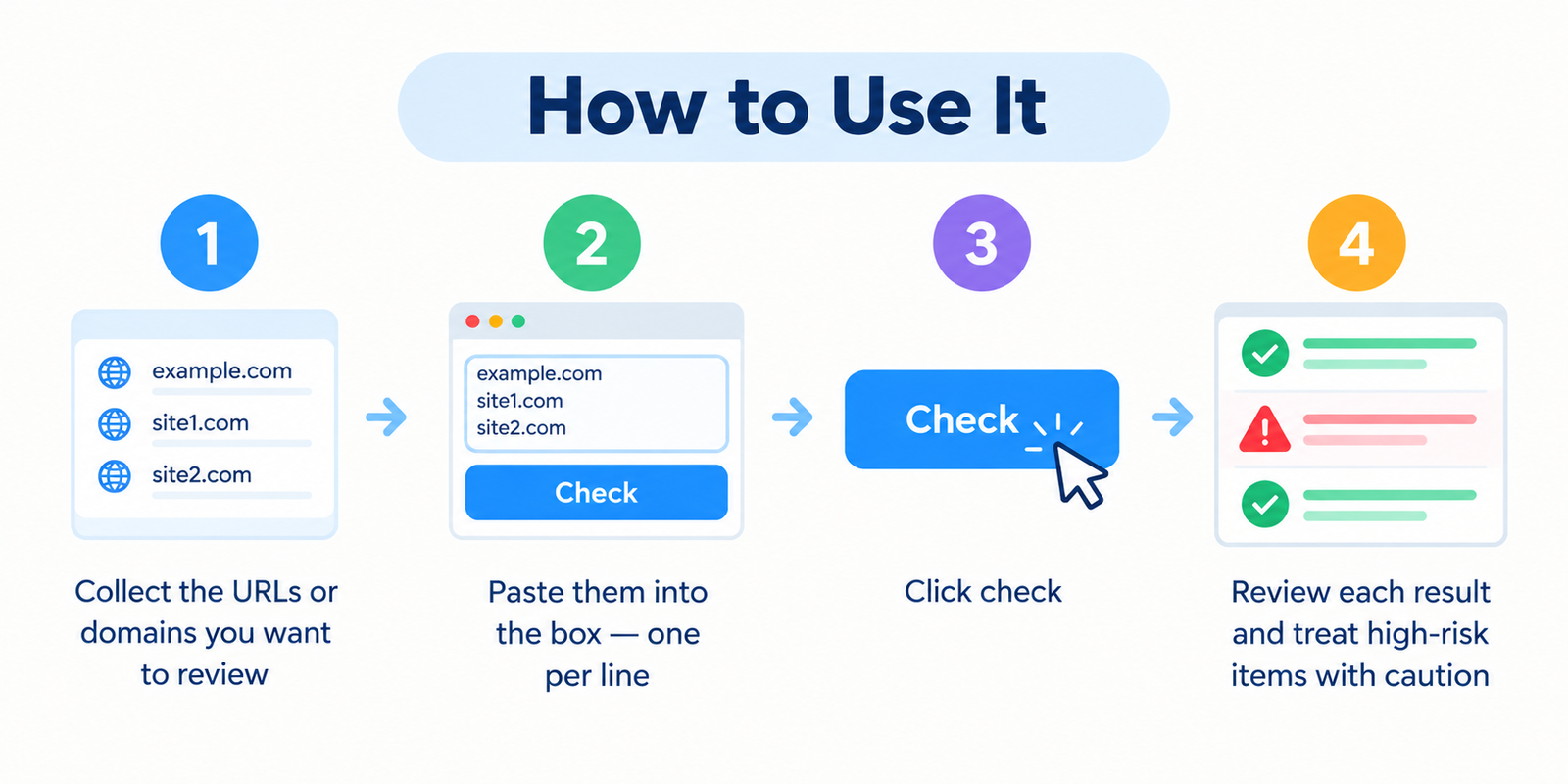
- Raccogli gli URL o i domini che desideri esaminare.
- Incollali nella casella di input, inserendo una voce per riga.
- Clicca sul pulsante di controllo.
- Esamina gli indicatori di reputazione o di rischio disponibili.
- Approfondisci i risultati insoliti o segnalati prima di visitare o interagire con il sito web.
Lo strumento può funzionare con URL completi o domini semplici, a seconda del formato di input supportato.
Cos'è un Controllo Domini Sospetti?
Un Controllo Domini Sospetti è un'utilità di sicurezza per i siti web che aiuta a esaminare le informazioni disponibili su un dominio o un URL alla ricerca di segnali di allarme che potrebbero meritare ulteriori indagini.
A seconda dei dati a disposizione dello strumento, le verifiche possono includere informazioni sulla reputazione, stato di blacklist, caratteristiche del dominio, comportamento di reindirizzamento o altri indicatori legati alla sicurezza.
Lo scopo non è dichiarare un sito web assolutamente sicuro o non sicuro. Piuttosto, ti aiuta a identificare i domini che potrebbero richiedere maggiore cautela.
Cosa può aiutarti a investigare questo controllo
Potresti voler esaminare un dominio quando ti poni domande come:
- Questo dominio ha avvisi di sicurezza o di reputazione noti?
- L'URL sembra imitare un marchio o un servizio noto?
- Vale la pena indagare su un dominio sconosciuto proveniente da un'email, un SMS o una chat?
- Un dominio di riferimento in un rapporto di backlink appare insolito?
- Il sito web reindirizza i visitatori verso qualcosa di inaspettato?
- Ci sono troppe poche informazioni disponibili per prendere una decisione sicura?
- Un nome che imita da vicino un'azienda fidata
- Una richiesta di accesso o di pagamento inattesa
- Avvisi di sicurezza
- Reindirizzamenti ingannevoli
- Richieste di password, dati di carte di credito o informazioni sensibili
- Contenuti della pagina insoliti o ingannevoli
- Sostituire una lettera con un carattere dall'aspetto simile
- Aggiungere parole extra prima o dopo un marchio noto
- Utilizzare un sottodominio ingannevole
- Modificare il dominio di primo livello
- Utilizzare piccole differenze di ortografia facili da trascurare
- Se tu o qualcuno che lavora per te avete creato intenzionalmente i link
- Se i link fanno parte di uno schema di link a pagamento o manipolativo
- Se disponi di un numero significativo di link artificiali o di bassa qualità
- Se Search Console mostra un'azione manuale per link non naturali
- Leggi il nome di dominio completo prima di fare clic.
- Fai attenzione ai messaggi urgenti che sostengono che il tuo account verrà chiuso o sospeso.
- Non inserire password dopo aver seguito un link inaspettato.
- Apri servizi importanti utilizzando il tuo preferito (bookmark) o l'app ufficiale quando possibile.
- Usa password uniche e l'autenticazione a più fattori per gli account importanti.
- Mantieni aggiornati il browser, il sistema operativo e il software di sicurezza.
- Evita di scaricare file eseguibili o estensioni del browser inattesi.
- Verifica le richieste insolite tramite un metodo di contatto ufficiale indipendente.
- Non inserire informazioni di accesso, bancarie o personali.
- Controlla attentamente l'ortografia del dominio.
- Cerca in modo indipendente il sito web ufficiale dell'organizzazione.
- Confronta l'URL sospetto con il dominio ufficiale noto.
- Usa servizi di sicurezza o di reputazione affidabili per ulteriori controlli.
- Se il messaggio afferma di provenire da un'azienda, contatta quell'azienda tramite il suo sito web ufficiale o la sua app.
- Controllo Blacklist
- Controllo Malware Google
- Controllo Whois
- Controllo Età Dominio
- Controllo Stato Server
Un controllo dei domini dovrebbe essere utilizzato insieme alle protezioni di sicurezza del tuo browser, a un software antivirus o di sicurezza per endpoint e a un attento giudizio.
Segnali di avvertimento comuni da verificare
Nessun singolo segnale di avvertimento dimostra che un dominio sia malevolo. Il rischio dovrebbe essere valutato combinando diversi segnali.
| Segnale | Perché merita attenzione |
|---|---|
| Avviso di sicurezza noto | L'URL o il dominio potrebbero comparire in dati disponibili su malware, phishing o reputazione. |
| Nome di dominio simile (Look-alike) | Gli aggressori potrebbero utilizzare nomi che assomigliano molto a banche, negozi, social network o portali di accesso. |
| Reindirizzamenti inattesi | La destinazione finale potrebbe differire dall'URL che ti aspettavi di visitare. |
| Registrazione molto recente | Un nuovo dominio non è automaticamente insicuro, ma una cronologia limitata può rendere più difficile valutarne la reputazione. |
| Struttura dell'URL insolita | Errori di ortografia, sottodomini ingannevoli, caratteri eccessivi o strutture di dominio confuse potrebbero meritare una revisione più attenta. |
| Dati sulla reputazione limitati | I domini nuovi o poco conosciuti potrebbero non avere ancora una cronologia sufficiente affinché i sistemi di reputazione possano valutarli con sicurezza. |
Considera sempre il contesto completo invece di affidarti a un singolo indicatore.
I nuovi domini non sono automaticamente pericolosi
Un dominio registrato di recente potrebbe appartenere a una nuova attività, a un blog, a un progetto o a un'organizzazione perfettamente legittimi.
L'età del dominio dovrebbe quindi essere trattata come contesto, non come prova di comportamento malevolo.
Un nuovo dominio potrebbe meritare un controllo extra quando viene combinato con altri segnali di avvertimento come:
Domini simili e di impersonificazione (Look-alike)
Una tecnica di phishing comune consiste nel registrare un dominio che appare simile a un sito web legittimo.
Gli esempi possono includere:
Leggi sempre con attenzione il dominio effettivamente registrato, specialmente prima di inserire password, informazioni di pagamento o dati personali.
Come leggere i risultati in modo responsabile
Nessun problema noto trovato
I dati disponibili non hanno identificato un avviso noto al momento del controllo. Questa non è una garanzia che il sito web sia sicuro.
Segnali sospetti o elevati
Uno o più indicatori meritano un'indagine più approfondita. Evita di inviare informazioni sensibili finché non hai verificato autonomamente il sito web.
Avviso noto o risultato ad alto rischio
Tratta il dominio con cautela. Evita download, accessi, pagamenti o altre interazioni finché l'avviso non è stato esaminato in modo indipendente.
Dati limitati o non disponibili
Potrebbero non esserci abbastanza informazioni sulla reputazione per giungere a una conclusione utile. I domini nuovi o meno conosciuti comunemente hanno una cronologia limitata.
Perché un risultato pulito non è una garanzia di sicurezza
I database delle minacce e della reputazione non possono identificare immediatamente ogni sito web dannoso.
Una pagina di phishing o malware creata di recente potrebbe apparire prima che i sistemi di reputazione abbiano raccolto abbastanza informazioni per segnalarla.
Un dominio potrebbe anche cambiare comportamento nel tempo o contenere sia pagine legittime che compromesse.
Per questo motivo, valuta sempre l'URL esatto e le circostanze in cui lo hai ricevuto.
Domini sospetti nei rapporti sui backlink
Gli strumenti SEO a volte segnalano backlink provenienti da domini sconosciuti o di bassa qualità.
Un backlink insolito non significa automaticamente che il tuo sito web abbia un problema e non dovresti disconoscere automaticamente ogni dominio dall'aspetto sospetto.
Google afferma che la maggior parte dei siti web non ha bisogno di usare lo strumento di disattivazione dei link (Disavow Links) poiché i suoi sistemi possono solitamente determinare quali link considerare affidabili.
Se stai indagando sui backlink, considera prima:
Lo strumento Disavow Links è una funzione avanzata e dovrebbe essere usato con cautela.
Abitudini di sicurezza pratiche
Cosa fare se un link sembra sospetto
Bingo Web Rabbit
Controllo Domini Sospetti vs Software Antivirus
Questi strumenti servono a scopi diversi.
| Strumento | Scopo Principale |
|---|---|
| Controllo Domini Sospetti | Esamina le informazioni disponibili sul rischio e sulla reputazione di un dominio o di un URL. |
| Antivirus / Sicurezza Endpoint | Protegge il tuo dispositivo da malware, file dannosi e altre minacce. |
| Protezione del Browser | Può avvisare quando si tenta di visitare siti web notoriamente pericolosi. |
Questo strumento non analizza i file sul tuo computer e non deve essere considerato un sostituto del software di sicurezza per endpoint.
Domande Frequenti
Il Controllo Domini Sospetti è gratuito?
Sì. Puoi usare il controllore standard senza creare un account.
Quanti URL posso controllare contemporaneamente?
Puoi controllare fino a 20 URL o domini alla volta, con una voce per riga.
Un risultato pulito significa che un sito web è completamente sicuro?
No. Un risultato pulito significa solo che i dati disponibili non hanno identificato un problema noto al momento del controllo.
Un avviso prova che un sito web è malevolo?
Non sempre. Falsi positivi e informazioni sulla reputazione non aggiornate sono possibili, quindi i risultati importanti dovrebbero essere verificati in modo indipendente.
Un sottodominio può essere insicuro mentre il dominio principale è legittimo?
Sì. Host o sottodomini diversi possono servire contenuti differenti. Quando possibile, controlla l'hostname esatto o l'URL che ti è stato fornito.
Un nuovo dominio è automaticamente sospetto?
No. L'età del dominio è solo un elemento di contesto e dovrebbe essere considerata insieme ad altri indicatori.
L'HTTPS è la prova che un sito web è sicuro?
No. L'HTTPS crittografa la comunicazione tra il tuo browser e il sito web, ma anche un sito web dannoso può utilizzare l'HTTPS.
Questo è lo stesso di una scansione antivirus?
No. Questo strumento valuta i segnali disponibili di un dominio o di un URL. Non esegue la scansione del computer o dei file scaricati alla ricerca di malware.
Dovrei disconoscere ogni backlink sospetto?
No. La maggior parte dei siti web non ha bisogno di disconoscere normali backlink indesiderati. Lo strumento Disavow di Google è pensato per situazioni specifiche che coinvolgono link artificiali o di spam sostanziali e dovrebbe essere usato con cautela.
Strumenti Correlati
Esclusione di responsabilità
Il Controllo Domini Sospetti fornisce esclusivamente segnali informativi di rischio e reputazione. I risultati dipendono dalle informazioni disponibili al momento del controllo e potrebbero essere incompleti, ritardati o errati.
Un risultato pulito non garantisce che un sito web sia sicuro, e un avviso dovrebbe essere indagato in modo indipendente prima di giungere a una conclusione definitiva.
Se un URL richiede password, dettagli di pagamento, download o altre informazioni sensibili e non sei sicuro della sua autenticità, verifica la richiesta tramite il sito web ufficiale dell'organizzazione o un altro canale fidato prima di procedere.