Suspicious Domain Checker
Entrez jusqu'à 20 URL (chaque URL doit être sur une ligne distincte)
Vérificateur de domaines suspects
Tous les liens inconnus ne sont pas dangereux, mais les domaines inconnus ou inhabituels méritent un examen attentif avant toute interaction.
Collez jusqu'à 20 URL ou domaines, un par ligne, et ce vérificateur de domaines suspects gratuit vous aide à examiner les signaux de risque et de réputation disponibles.
Il peut s'avérer utile pour filtrer des liens inconnus, examiner des domaines référents, vérifier des URL provenant de messages ou enquêter sur des domaines d'apparence inhabituelle.
Important : Une vérification de domaine constitue uniquement un premier filtre de sécurité. Un résultat positif ou propre ne prouve pas qu'un site Web est sûr, et un avertissement ne prouve pas automatiquement une intention malveillante.
Comment utiliser le Vérificateur de domaines suspects
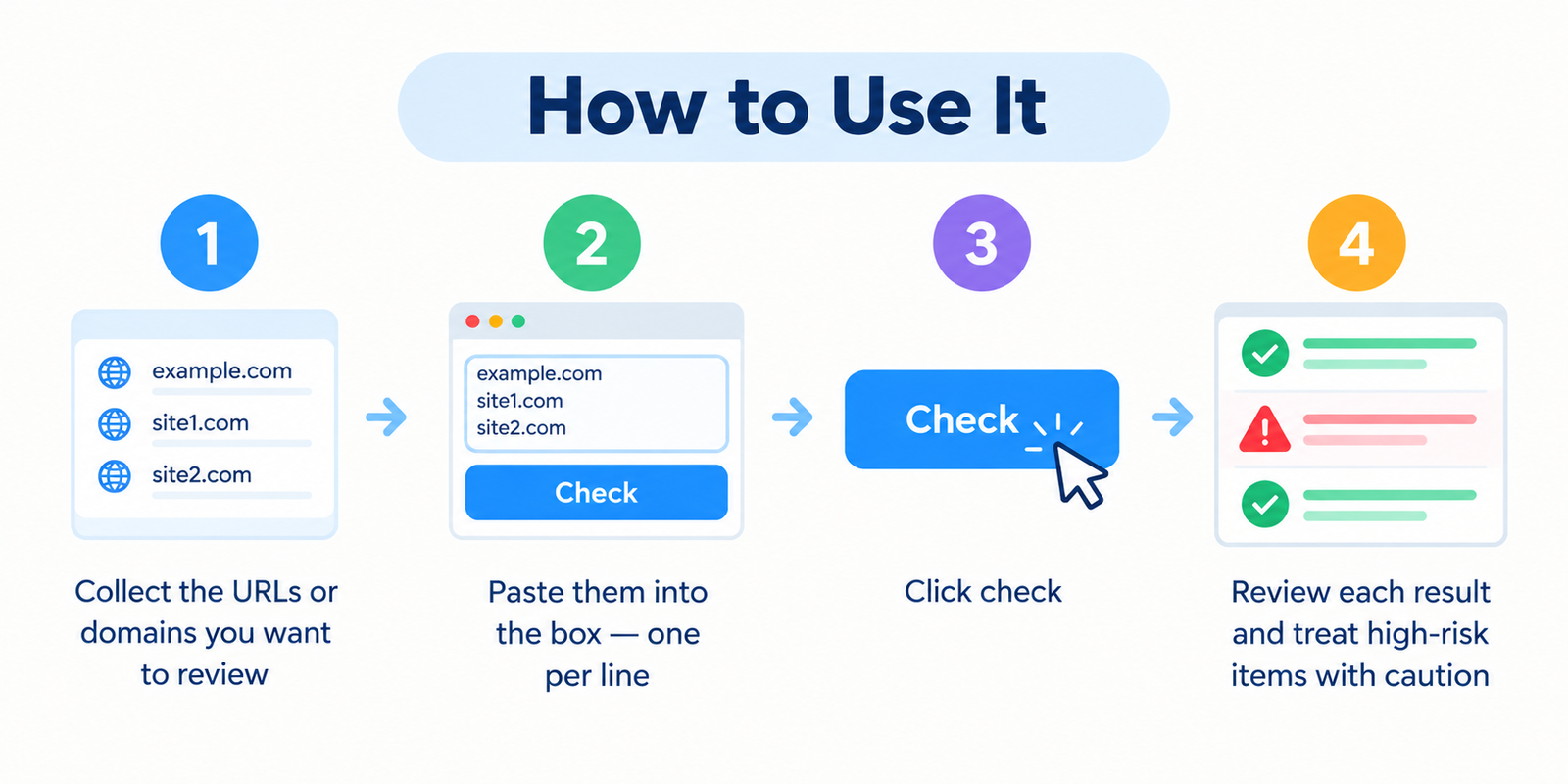
- Rassemblez les URL ou les domaines que vous souhaitez examiner.
- Collez-les dans la zone de saisie, à raison d'une entrée par ligne.
- Cliquez sur le bouton de vérification.
- Examinez les indicateurs de réputation ou de risque disponibles.
- Enquétez sur les résultats inhabituels ou signalés avant de visiter ou d'interagir avec le site Web.
L'outil peut traiter des URL complètes ou de simples domaines, selon le format de saisie pris en charge.
Qu'est-ce qu'un Vérificateur de domaines suspects ?
Un vérificateur de domaines suspects est un utilitaire de sécurité de sites Web qui aide à examiner les informations disponibles sur un domaine ou une URL afin de détecter des signes d'alerte méritant une investigation plus approfondie.
Selon les données accessibles à l'outil, les vérifications peuvent inclure des informations de réputation, le statut de liste noire, les caractéristiques du domaine, le comportement de redirection ou d'autres indicateurs liés à la sécurité.
L'objectif n'est pas de déclarer qu'un site Web est absolument sûr ou dangereux. Il vous aide plutôt à identifier les domaines qui peuvent nécessiter une prudence accrue.
Ce que cette vérification peut vous aider à examiner
Vous pouvez souhaiter examiner un domaine lorsque vous vous posez des questions telles que :
- Ce domaine fait-il l'objet d'avertissements connus concernant la sécurité ou la réputation ?
- L'URL semble-t-elle imiter une marque ou un service bien connu ?
- Un domaine inconnu provenant d'un e-mail, d'un SMS ou d'un chat vaut-il la peine d'être examiné ?
- Un domaine référent dans un rapport de backlinks a-t-il l'air inhabituel ?
- Le site Web redirige-t-il les visiteurs vers un endroit inattendu ?
- Dispose-t-on de trop peu d'informations pour prendre une décision en toute confiance ?
Un vérificateur de domaine doit être utilisé conjointement avec les protections de sécurité de votre navigateur, un logiciel antivirus ou de sécurité pour points de terminaison, ainsi qu'un jugement avisé.
Signes d'alerte courants à examiner
Aucun signe d'alerte isolé ne prouve qu'un domaine est malveillant. Le risque doit être évalué en croisant plusieurs signaux.
| Signal | Pourquoi il mérite de l'attention |
|---|---|
| Avertissement de sécurité connu | L'URL ou le domaine peut figurer dans des bases de données de malwares, de phishing ou de réputation. |
| Nom de domaine sosie | Des attaquants peuvent utiliser des noms qui ressemblent fortement à des banques, des magasins, des réseaux sociaux ou des portails de connexion. |
| Redirections inattendues | La destination finale peut différer de l'URL que vous vous attendiez à visiter. |
| Enregistrement très récent | Un nouveau domaine n'est pas automatiquement dangereux, mais un historique limité rend la réputation plus difficile à évaluer. |
| Structure d'URL inhabituelle | Des fautes d'orthographe, des sous-domaines trompeurs, des caractères excessifs ou des structures de domaine déroutantes peuvent mériter un examen plus approfondi. |
| Données de réputation limitées | Les domaines nouveaux ou obscurs n'ont peut-être pas encore assez d'historique pour que les systèmes de réputation puissent les évaluer avec certitude. |
Examinez toujours le contexte global plutôt que de vous fier à un seul indicateur.
Les nouveaux domaines ne sont pas automatiquement dangereux
Un domaine enregistré récemment peut appartenir à une nouvelle entreprise, un nouveau blog, un nouveau projet ou une nouvelle organisation tout à fait légitime.
L'âge du domaine doit par conséquent être considéré comme un contexte et non comme la preuve d'un comportement malveillant.
Un nouveau domaine peut mériter une attention supplémentaire lorsqu'il est associé à d'autres signes d'alerte tels que :
- Un nom qui imite de très près une entreprise de confiance
- Une demande de connexion ou de paiement inattendue
- Des avertissements de sécurité
- Des redirections trompeuses
- Des demandes de mots de passe, de coordonnées bancaires ou d'informations sensibles
- Un contenu de page inhabituel ou trompeur
Domaines sosies et usurpation d'identité
L'une des techniques de phishing courantes consiste à enregistrer un domaine qui ressemble à s'y méprendre à un site Web légitime.
Les exemples peuvent inclure :
- Le remplacement d'une lettre par un caractère visuellement similaire
- L'ajout de mots supplémentaires avant ou après une marque connue
- L'utilisation d'un sous-domaine trompeur
- La modification du domaine de premier niveau
- L'utilisation de légères différences d'orthographe faciles à manquer
Lisez toujours attentivement le domaine réellement enregistré, en particulier avant de saisir des mots de passe, des informations de paiement ou des données personnelles.
Comment interpréter les résultats de manière responsable
Aucun problème connu détecté
Les données disponibles n'ont pas permis d'identifier d'avertissement connu au moment de la vérification. Cela ne garantit pas que le site Web est sûr.
Signaux suspects ou élevés
Un ou plusieurs indicateurs méritent une enquête plus approfondie. Évitez de transmettre des informations sensibles tant que vous n'avez pas vérifié le site Web de manière indépendante.
Avertissement connu ou résultat à haut risque
Traitez le domaine avec prudence. Évitez les téléchargements, les connexions, les paiements ou toute autre interaction tant que l'avertissement n'a pas fait l'objet d'une enquête indépendante.
Données limitées ou indisponibles
Il se peut qu'il n'y ait pas assez d'informations sur la réputation pour parvenir à une conclusion utile. Les domaines nouveaux ou moins connus disposent généralement d'un historique limité.
Pourquoi un résultat propre ne garantit pas la sécurité
Les bases de données sur les menaces et la réputation ne peuvent pas identifier immédiatement chaque site Web nuisible.
Une page de phishing ou de malware nouvellement créée peut apparaître avant que les systèmes de réputation n'aient recueilli suffisamment d'informations pour la signaler.
Un domaine peut également modifier son comportement au fil du temps ou contenir à la fois des pages légitimes et compromises.
Pour cette raison, évaluez toujours l'URL exacte et les circonstances dans lesquelles vous l'avez reçue.
Domaines suspects dans les rapports de backlinks
Les outils SEO signalent parfois des backlinks provenant de domaines inconnus ou de faible qualité.
Un backline inhabituel ne signifie pas automatiquement que votre site Web a un problème, et vous ne devez pas désavouer automatiquement chaque domaine d'apparence suspecte.
Google indique que la plupart des sites Web n'ont pas besoin d'utiliser l'outil de désaveu de liens (Disavow Links), car ses systèmes sont généralement capables de déterminer quels liens doivent être ignorés ou suivis.
Si vous enquêtez sur des backlinks, examinez d'abord :
- Si vous-même ou une personne travaillant pour vous avez créé intentionnellement les liens
- Si les liens font partie d'un système de liens payants ou manipulateurs
- Si vous disposez d'un nombre important de liens artificiels ou de faible qualité
- Si Search Console affiche une action manuelle pour liens non naturels
L'outil de désaveu de liens est une fonctionnalité avancée qui doit être utilisée avec prudence.
Bonnes pratiques de sécurité au quotidien
- Lisez le nom de domaine complet avant de cliquer.
- Soyez prudent face aux messages urgents prétendant que votre compte va être fermé ou suspendu.
- Ne saisissez pas de mots de passe après avoir suivi un lien inattendu.
- Ouvrez les services importants en utilisant vos propres signets ou l'application officielle dans la mesure du possible.
- Utilisez des mots de passe uniques et l'authentification multifacteur pour les comptes importants.
- Maintenez votre navigateur, votre système d'exploitation et vos logiciels de sécurité à jour.
- Évitez de télécharger des fichiers exécutables ou des extensions de navigateur inattendus.
- Vérifiez les demandes inhabituelles via un moyen de contact officiel et indépendant.
Que faire si un lien semble suspect ?
Bingo Web Rabbit vous recommande de suivre ces étapes :
- N'entrez aucune information de connexion, bancaire ou personnelle.
- Vérifiez attentivement l'orthographe du domaine.
- Recherchez le site Web officiel de l'organisation de manière indépendante.
- Comparez l'URL suspecte avec le domaine officiel connu.
- Utilisez des services de sécurité ou de réputation de confiance pour effectuer des contrôles supplémentaires.
- Si le message prétend provenir d'une entreprise, contactez cette entreprise via son site Web officiel ou son application.
Vérificateur de domaines suspects vs Logiciel antivirus
Ces outils remplissent des fonctions différentes.
| Outil | Objectif principal |
|---|---|
| Vérificateur de domaines suspects | Examine les informations de risque et de réputation disponibles pour un domaine ou une URL. |
| Antivirus / Sécurité des points de terminaison | Protège votre appareil contre les logiciels malveillants, les fichiers malveillants et d'autres menaces. |
| Protection du navigateur | Peut émettre un avertissement lors de la tentative de visite de sites Web dangereux connus. |
Cet outil ne scanne pas les fichiers présents sur votre ordinateur et ne doit pas être considéré comme un remplacement pour un logiciel de sécurité pour points de terminaison.
Foire aux questions
Le Vérificateur de domaines suspects est-il gratuit ?
Oui. Vous pouvez utiliser le vérificateur standard sans créer de compte.
Combien d'URL puis-je vérifier en même temps ?
Vous pouvez vérifier jusqu'à 20 URL ou domaines à la fois, à raison d'une entrée par ligne.
Un résultat propre signifie-t-il qu'un site Web est totalement sûr ?
Non. Un résultat propre signifie uniquement que les données disponibles n'ont pas permis d'identifier de problème connu au moment de la vérification.
Un avertissement prouve-t-il qu'un site Web est malveillant ?
Pas toujours. Des faux positifs et des informations de réputation obsolètes sont possibles, c'est pourquoi les résultats importants doivent être vérifiés de manière indépendante.
Un sous-domaine peut-il être dangereux alors que le domaine principal est légitime ?
Oui. Des hôtes ou sous-domaines différents peuvent diffuser des contenus différents. Dans la mesure du possible, vérifiez le nom d'hôte ou l'URL exacte qui vous a été fournie.
Un nouveau domaine est-il automatiquement suspect ?
Non. L'âge du domaine n'est qu'un élément de contexte parmi d'autres et doit être pris en compte avec d'autres indicateurs.
Le protocole HTTPS est-il la preuve qu'un site Web est sûr ?
Non. Le HTTPS chiffre la communication entre votre navigateur et le site Web, mais un site Web malveillant peut également utiliser le HTTPS.
Est-ce la même chose qu'un scan antivirus ?
Non. Cet outil évalue les signaux disponibles liés au domaine ou à l'URL. Il ne scanne pas votre ordinateur ni vos fichiers téléchargés à la recherche de malwares.
Dois-je désavouer tous les backlinks suspects ?
Non. La plupart des sites Web n'ont pas besoin de désavouer des backlinks indésirables ordinaires. L'outil de désaveu de Google est destiné à des situations spécifiques impliquant des liens artificiels ou de spam substantiels et doit être utilisé avec précaution.
Outils associés
- Recherche de liste noire
- Vérificateur de logiciels malveillants Google
- Vérificateur Whois
- Vérificateur d'âge de domaine
- Vérificateur d'état du serveur
Avis de non-responsabilité
Le Vérificateur de domaines suspects fournit uniquement des signaux d'information sur les risques et la réputation. Les résultats dépendent des informations disponibles au moment de la vérification et peuvent être incomplets, tardifs ou erronés.
Un résultat propre ne garantit pas qu'un site Web est sûr, et un avertissement doit faire l'objet d'une enquête indépendante avant de tirer une conclusion définitive.
Si une URL demande des mots de passe, des informations de paiement, des téléchargements ou d'autres données sensibles et que vous avez des doutes sur son authenticité, vérifiez la demande par le biais du site Web officiel de l'organisation ou d'un autre canal de confiance avant de continuer.